Talk to your Mac.உங்க Mac-கிட்ட பேசுங்க.
Sasu is a little robot that lives in the corner of your screen. Say “Hey Sasu” in English, Tamil or a mix of both, and it opens apps, sorts files and changes settings. It only works for your voice, and anything it does can be undone.
- English · தமிழ் · Tanglish
- Voice stays on your Mac
- Only your voice
- Undo anything
A free, open-source voice assistant for Mac, in English and தமிழ். Apple Silicon, macOS 13 or later.
Sasu is waiting in the corner.
Say it the way you'd say it to a friend.
No commands to learn. English, Tamil, or the mix most of us actually speak. Sasu answers in the same language you used, with the Mac's own Tamil and English voices.
“Hey Sasu, open Safari and look up flights to Chennai”
English. Opens Safari and searches.
“Downloads la irukura PDF ellam oru folder-la podu”
Tanglish. Finds the PDFs, shows the plan, moves them.
“நாளைக்கு காலையில அம்மாவுக்கு போன் பண்ண நினைவூட்டு”
தமிழ். Adds a reminder for tomorrow morning.
“Spotify-la next song podu, volume konjam kammi pannu”
Tanglish. Skips the song, turns the volume down.
“Good morning”
English. Weather, today's meetings and reminders, in one breath.
“Focus 25 minutes”
English. Closes distractions, then puts everything back when time's up.
“இது என்ன?”
தமிழ். Looks at your screen and explains it in Tamil.
“Translate mode”
English. You speak Tamil, Sasu says it in English, and back.
“Inniku Rahu kaalam eppo?”
Tanglish. Rahu kaalam, thithi and the Tamil date for your city.
“Sasu, undo”
English. Puts back whatever it just changed.
See it on your Mac.
Real screens from the app, not mock-ups.
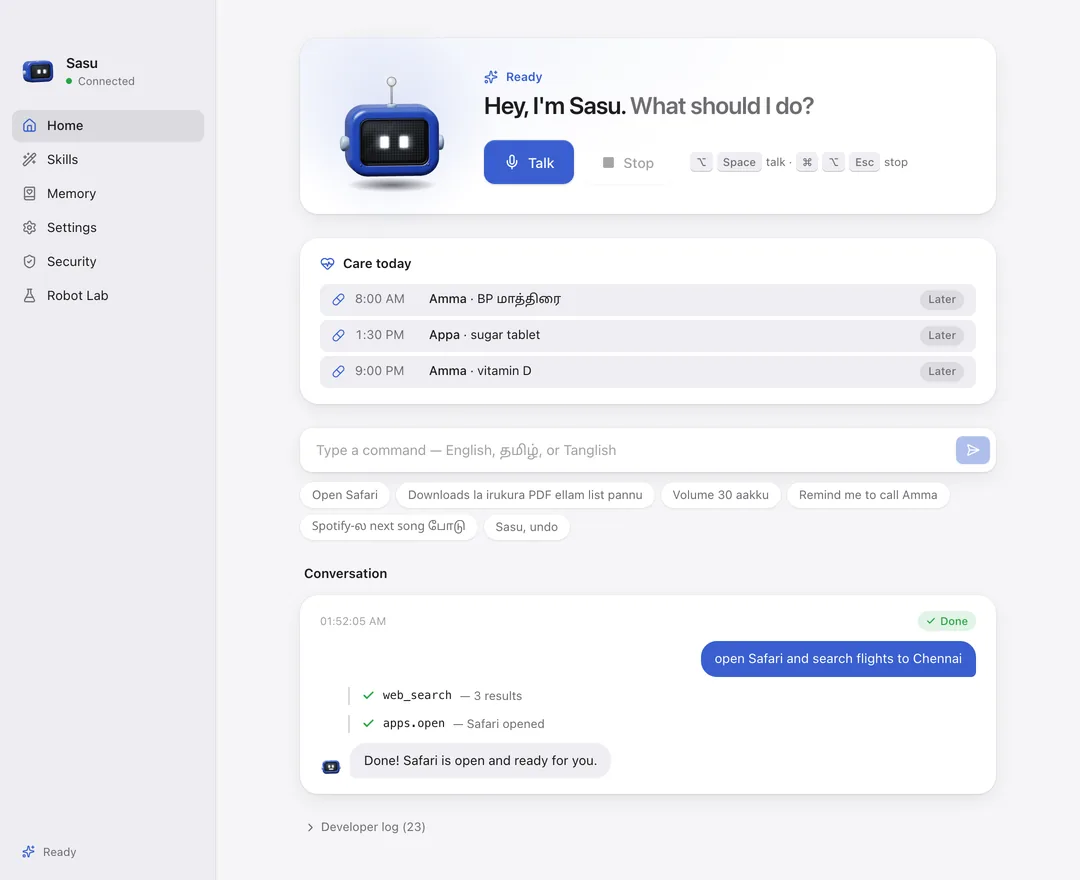
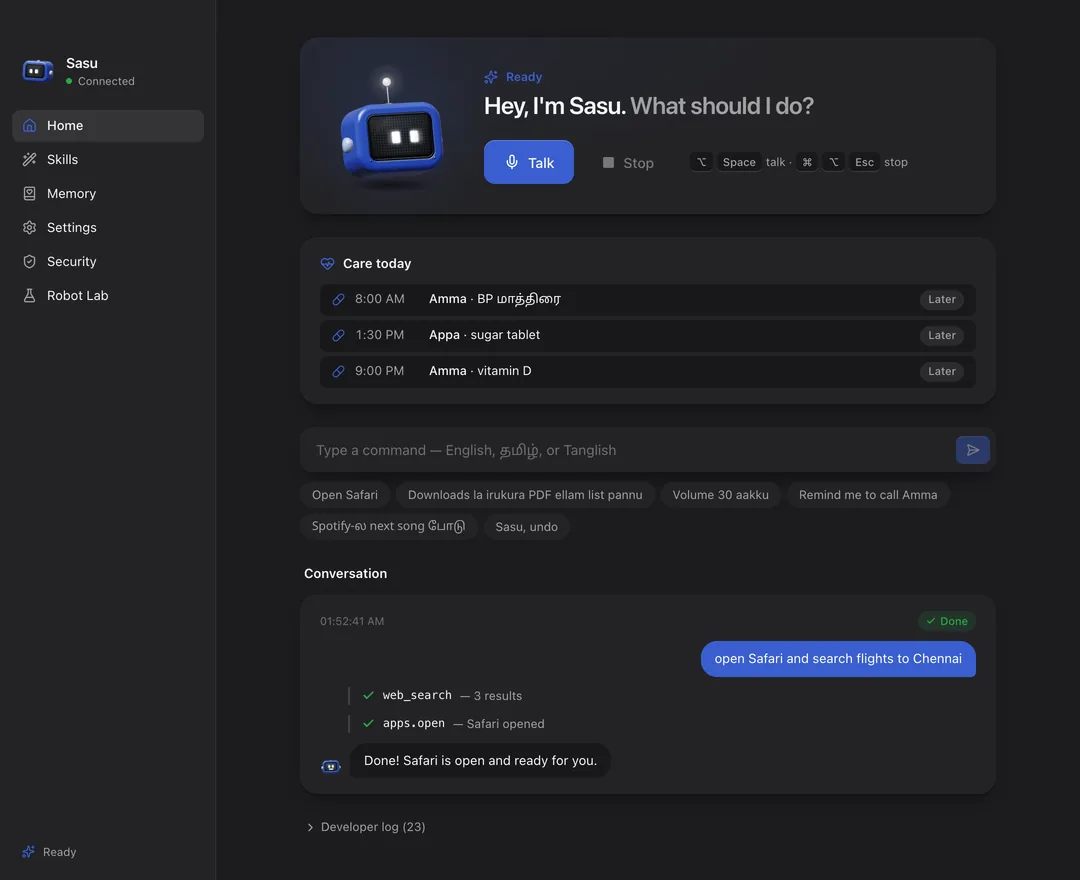
Changed your mind? Say “undo”.
Every change Sasu makes is written down together with how to reverse it. Files go back to where they were, settings return to what they were, apps it opened close again. Thrown-away files wait in Sasu's own bin, so even those come back.
Works by voice, with ⌘⌥Z, or with the Undo button next to every request.
Sorting my Downloads
4 changes, all undoable
- Made a folder called PDFs in Downloads
- Moved Invoice September.pdf into PDFs
- Moved Boarding pass.pdf into PDFs
- Turned the volume from 70 to 30
It can touch your whole Mac. So it only listens to you.
An assistant with this much access has to be hard to misuse: by people nearby, by websites, by other apps, and by AI tricks hidden in a file.
“Sasu, delete my old screenshots.”
Your voice. Here's the plan:
Throw away 12 screenshots from the Desktop. They go to Sasu's bin, so you can undo it.
Confirm with Touch ID
Knows your voice
A voiceprint kept encrypted on your Mac. Every command is checked against it.
Touch ID for risky steps
Deleting, system changes, anything outside your home folder. Voice alone is never enough.
Trap files
Sasu plants decoy files. If anything, even a tricked AI, touches them, Sasu locks itself and tells you.
Leak guard
Text read from files or web pages can't be smuggled out through links or commands.
Panic word
Say your secret word and Sasu locks instantly and hides its history until Touch ID.
Intruder log
Anyone who tried while you were away: when, what they said, how close their voice was.
Deaf when you're away
Locks with your screen, with fast user switching, and after you've been idle.
Tamper-evident log
Every action is sealed in a hash chain. If a line is edited, the Security page shows it.
Family voices
Enrol family and kids. Kids get music, YouTube and jokes; only you can do risky things.
Intruder photo
Optional: one camera photo when a stranger tries, or a trap file is touched. Stays on your Mac.
Scam checker
“Sasu, idhu scam-aa?” spots OTP tricks, fake bank links, prizes and “digital arrest” threats, and can warn when you copy one.
Encrypted memory
“Remember amma's birthday is June 3.” Encrypted, and only your voice can ask for it back.
Amma mode
Looks after the people who looked after you.
Enrol your parents' voices as Elder. Sasu speaks to them the way they speak, and tells you when something needs you.
Slow Tamil, big text
When an elder speaks, Sasu answers slowly in Tamil, with large captions they can read without glasses.
Medicine reminders
“Amma-ku 8 mani BP maathirai reminder vai.” At 8 Sasu asks, listens for “ஆமா”, and asks again after 15 minutes.
Missed-dose alert
Still no answer? You get a text, so you can call and check in. The schedule is encrypted on the Mac.
Call family by voice
“மகனுக்கு போன் பண்ணு” finds the son in Contacts and starts a FaceTime audio call, after a spoken yes.
Say “udhavi” for help
“Help / உதவி” starts a 10-second spoken countdown they can cancel, then texts the emergency contact.
Care today
- 8:00 AMAmma · BP மாத்திரை Taken
- 1:30 PMAppa · sugar tablet Texted you
- 9:00 PMAmma · vitamin DLater
You can hear what it's doing.
Every sound is synthesized live. It comes from wherever the robot sits on your screen, and each step of a task plays one note higher, so you hear progress without looking.
Serious about security. Not serious about everything.
Sasu is a little coworker, not a search box. Poke it and see.
Pick a robot.
Four shapes, four colours. The shape can also show which mode Sasu is in.
Wondering how it stacks up against Siri, ChatGPT or Claude? See the comparison.
Questions people ask
Say hey to Sasu.
Free, open source, and yours. It takes two minutes to set up.